Document intelligence: what it is, how it works, and API vs platform
For teams comparing document AI options, from cloud APIs to full platforms. See what document intelligence adds to OCR, where it breaks, and how to choose.

Key takeaways
- Document intelligence is a category of AI software that turns PDFs, scans and photos into structured data. It returns text, key-value pairs (each label with its value), tables and the document type, not only the characters.
- It's a category of software, not one product. Microsoft's Azure Document Intelligence is one service in that category. Document AI and document understanding are other names for it.
- On top of plain OCR, document intelligence adds layout analysis, key-value extraction, table reconstruction and classification.
- Microsoft's Azure Document Intelligence, formerly Azure AI Document Intelligence, is a cloud API that extracts data and bills by the page. A document intelligence platform adds the steps around extraction, such as checks across documents and a review queue. Choose by which team, engineering or operations, will handle the values the software isn't sure of.
- Plan for layout drift, miscalibrated confidence, cross-document mismatches and hard handwriting before go-live.
On this page
Document intelligence is a category of AI tools that turn PDFs, scans and photos into structured data. It reads the text, links each value to its label, rebuilds tables and works out what type of document each file is. Plain OCR returns only the characters.
It's a category, not one product. Microsoft's version is Azure Document Intelligence, a cloud API. Your developers send it a document over the internet and get the data back. Google and Amazon sell similar APIs. A document intelligence platform such as Docsumo, our product, also checks the data and sends values it isn't sure of to a person. With an API, your team builds those steps itself.
We start with what document intelligence means and the two other names people use for it. Then we show what it adds to OCR, where it fails, and how Microsoft's API compares with a platform.
What is document intelligence?
Picture an invoice with "Total Due: $4,120.50" at the bottom. OCR sees a line of text. Document intelligence works out that $4,120.50 is the amount owed. It returns that number as the invoice total, ready for your accounting system, and no one has to type it in.
Vendors describe the core the same way. Microsoft says its service extracts key-value pairs, text and tables and returns them as JSON, a data format other software can read. Google says Document AI turns unstructured document data into structured data. That step is called extraction. A business process needs more steps before and after it. Either your team or the software has to sort and split the files and check values against other documents. Fields the software isn't sure of go to a person before the data goes into your systems. An API and a platform differ in who does that work, as the comparison below shows.
What is document understanding?
Document understanding is the name researchers use for the same idea. The goal is software that reads a page's text, layout and visual cues together, the way a person does. OCR alone sees only the characters. Software that understands a document can tell its type, pull out its fields or answer questions about it. Microsoft researchers define document AI, or document intelligence, as techniques for "reading, understanding, and analyzing business documents". Researchers test AI models such as LayoutLM, from Microsoft Research, on reading forms, reading receipts and sorting documents by type.
Some vendors use the term as a product name. UiPath's Document Understanding extracts data from forms and invoices, and Google calls Document AI a document processing and understanding platform. Docsumo, our product, uses the term too. Its AI document understanding reads a page's layout, tables and handwriting together.
For a buyer, all three names mean the same kind of software.
| Name | Where you'll see it |
|---|---|
| Document intelligence | Microsoft's Azure Document Intelligence, and platforms that cover the whole workflow |
| Document AI | Google Cloud's Document AI, research papers, and the category as a whole: see what is document AI |
| Document understanding | Machine-learning research, and UiPath's Document Understanding |
For tools, see AI document understanding tools compared.
How document intelligence differs from basic OCR
Feed OCR a receipt and you get a string of characters. Document intelligence adds four layers on top.
Layout analysis
Finds headers, paragraphs, tables and reading order. More in layout detection.Key-value pairs
Links a label to its value, such as "Invoice Number" to "INV-2024-0892". More in key-value pair extraction.Table reconstruction
Keeps each price on the row of its item and quantity. More in table extraction.Classification
Works out whether a file is a W-2, a bank statement or a purchase order before extraction starts. More in document classification.
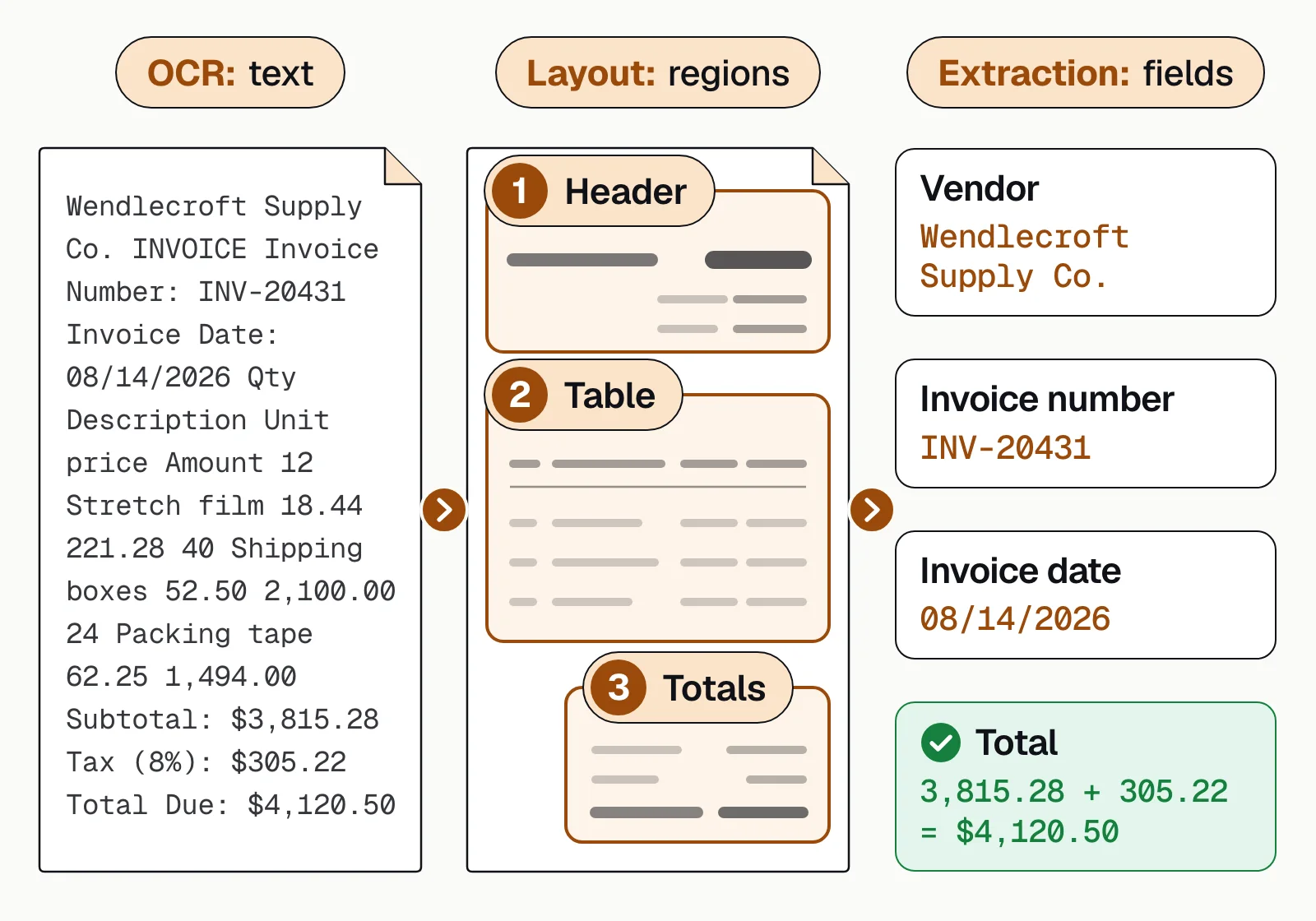
OCR output usually needs custom parsing or a person before it's usable. Document intelligence output can go straight to your systems once it passes validation.
Core capabilities, and where each one struggles
Most products share the same capabilities. They differ in how well each one holds up on hard documents.
| Capability | Works well on | Struggles with |
|---|---|---|
| Printed text | Clean scans, standard fonts | Low-resolution images, decorative fonts |
| Handwriting | Block letters, consistent styles | Cursive, poor legibility, mixed languages |
| Tables | Bordered tables, simple layouts | Borderless tables, merged cells, tables across pages |
| Key-value pairs | Labels in consistent positions | Implied labels, variable layouts |
| Classification | Distinct document types | Hybrid documents, new formats |
Most vendors offer prebuilt models for common documents, such as invoices, receipts, IDs and tax forms, and custom models trained on your own layouts. Handwriting goes through intelligent character recognition, and accuracy depends on legibility.
The document intelligence workflow
Extraction is one stage. The stages around it decide whether the output is safe to use without a person checking every page.
- Email attachments
- Scans and uploads
- API submissions
- 01Classify and split
- 02Extract with confidence scores
- 03Validate across documents
- 04Review exceptions
Each extracted value carries a confidence score. A 0.95 on an invoice total means the model is fairly sure, not certain. Validation then checks the values against rules and other documents. Does the total equal the line items? Does the PO number match an open purchase order? Values below their threshold and failed checks go to a person, whose corrections can improve the model. The full workflow is in automated document processing.
Where document intelligence fails
Four problems come up again and again. Plan for them before go-live.
- Layout driftA vendor redesigns its invoice and a model trained on the old layout pulls the wrong fields. Track accuracy by sender so the change shows up in days.
- Miscalibrated confidenceA model can report 95% confidence on a wrong value, because confidence measures certainty, not correctness. Set thresholds per field on your own documents.
- Cross-document mismatchesThe invoice says $10,000, the PO $9,500, and the receiving record shows 95 units at $100. Single-document extraction can't catch it; you need checks across the set.
- Handwriting edge casesDoctors' notes, rushed signatures and forms filled in outside the boxes often need a person, whatever the model.
Aim for predictable automation rather than total automation. You want to know in advance which documents will flow through untouched and which will need a person.
API versus platform
Microsoft, Google and Amazon sell document intelligence as cloud APIs. You send a document and get structured data back. Document intelligence platforms add the layers above extraction. The choice usually depends on which team will run the process day to day.
Which team will run it?
A platform is worth paying for once the values that need a person are too many to handle in a shared inbox. It's also worth it when one decision needs several types of documents, as with a loan file or a claim. Docsumo runs in the cloud only. Some cloud APIs also come as containers, which are software packages you run on your own servers. Azure's API does. If documents can't leave your own data center, an API like that is the better match.
Azure AI Document Intelligence vs a document intelligence platform
Microsoft's service started as Form Recognizer and was then called Azure AI Document Intelligence. Its current name is Azure Document Intelligence in Foundry Tools. Microsoft now presents it as part of Azure Content Understanding. The service extracts text, key-value pairs, tables and structure from documents, and Microsoft bills it by the page. The table below calls it Azure AI Document Intelligence and compares it with a platform such as Docsumo. The Azure facts come from Microsoft's own pages, checked September 25, 2026.
| Compared on | Azure AI Document Intelligence | A document intelligence platform (Docsumo) |
|---|---|---|
| What you get back | Text, key-value pairs, tables and structure, as JSON | Named fields and tables, checked before they reach your systems |
| Price | Per 1,000 pages, $1.50 to read text, $10 for layout and prebuilt models and $30 for custom extraction. The free tier gives 500 pages a month but reads only the first 2 pages of each file | A 14-day free trial on up to 1,000 pages. Docsumo quotes a price for each paid plan |
| Values it isn't sure of | Confidence scores. Microsoft's docs describe no review queue and advise adding human review | A review queue, with a confidence threshold for each field |
| Checks across documents | Microsoft suggests using Content Understanding or building the checks yourself | Built in, on the Enterprise plan |
| Where it runs | Azure's cloud. The Read and Layout models can also run on your own servers, in containers | Cloud only |
Azure is the better fit for engineers who build on Azure, or whose files must stay on their own servers. A platform fits when an operations team will check the values the software isn't sure of. To see Azure next to Amazon Textract and Google Document AI, read Textract vs Azure vs Google Document AI. For Azure's prices, free tier and alternatives, see Docsumo vs Azure Document Intelligence.
Our take. Most teams start by comparing extraction accuracy, and most vendors now do well on clean pages. The better question is who deals with the pages that aren't clean. If your engineers will handle those pages, an API is a fine start. If an operations team is responsible for the numbers, buy the review queue and the checks along with the model.
- 99%field-level accuracy across 250+ document types
- 95%+of documents processed straight through, without manual review
Before you pick a tool
Whatever a vendor calls it, the job is to turn documents into data you can trust. Run a week of your own messiest files through each option and count how many come through untouched. That number, and who handles the rest, should decide it.
Book a demo with a few of your own documents, or start a free trial. Plans are on the pricing page.
Frequently asked questions
What is document intelligence?
Document intelligence is a category of AI software that turns documents such as PDFs, scans and photos into structured data. It extracts the text, key-value pairs, tables and structure. OCR only turns the page into characters. Document intelligence also works out which words are labels, which are values and which rows make up a table.
Is document intelligence the same as Azure Document Intelligence?
No. Document intelligence is the category, meaning any software that turns documents into structured data. Azure Document Intelligence in Foundry Tools, formerly Azure Form Recognizer, is Microsoft's cloud service in that category. Google Document AI, Amazon Textract and document intelligence platforms such as Docsumo are others. For a side-by-side, see Azure Document Intelligence alternatives.
Is there a Google Document Intelligence?
Google's product in the category is called Document AI. Different name, same category. Google sells Document AI and Microsoft sells Azure Document Intelligence. Researchers use document AI and document intelligence as general terms, and document understanding too. More in what is document AI.
How much does document intelligence cost?
Cloud APIs charge per page. Microsoft lists Azure Document Intelligence at $1.50 per 1,000 pages for reading text and up to $30 per 1,000 pages for custom extraction. These are prices for Microsoft's US East region as of September 2026. There's also a free tier of 500 pages a month. Platforms usually charge by plan and volume. Docsumo offers a 14-day free trial on up to 1,000 pages; see pricing.
What's the difference between document intelligence and IDP?
The terms overlap. Document intelligence usually means the part that reads documents and pulls out the data, often sold as a cloud API. Intelligent document processing (IDP) usually means the whole workflow, including validation, review and delivery to your systems. See what is intelligent document processing.
Is document intelligence the same as OCR?
No. OCR turns an image of text into characters. Document intelligence also finds the layout, links each value to its label, rebuilds tables and identifies the document type. See IDP vs OCR.
Sources
- Microsoft Learn: What is Azure Document Intelligence in Foundry Tools?
- Microsoft Learn: Azure Document Intelligence in Foundry Tools (formerly Azure AI Form Recognizer) FAQ
- Microsoft Azure: Azure Document Intelligence (now part of Azure Content Understanding in Foundry Tools)
- Microsoft Azure: Azure Document Intelligence in Foundry Tools pricing
- Microsoft Learn: Interpret and improve model accuracy and confidence scores
- Microsoft Learn: Choose the right Azure AI tool for document processing
- Microsoft Learn: Install and run Docker containers for Document Intelligence
- Google Cloud: Document AI overview
- AWS: Amazon Textract features
- Cui, Xu, Lv and Wei (Microsoft Research): Document AI: Benchmarks, Models and Applications
- Xu et al. (Microsoft Research): LayoutLM: Pre-training of Text and Layout for Document Image Understanding
- UiPath: IXP and Document Understanding
First published . Last updated .