Human-in-the-loop systems: how to design review that holds up in production
For operations and platform teams putting AI extraction into production. You'll know where to put people in the loop, how to size the queue and how to tell whether review is actually working.

Key takeaways
- A human-in-the-loop (HITL) system lets AI handle the documents it's sure about and sends the uncertain or risky ones to a person, whose decision is logged and fed back into the system.
- Confidence thresholds decide what a person sees. Set them per field, stricter on bank details and amounts than on fields that are easy to fix later.
- Confidence scores miss errors the model is sure about, so pair them with business rules: totals that don't add up, changed bank details, amounts over a limit.
- Most HITL failures are design failures: a queue sized for the average day, reviewers who approve without seeing the source, and corrections that never reach the model.
- Measure escalation rate, reviewer accuracy, review time and end-to-end accuracy from day one, and tune thresholds from that data rather than by feel.
On this page
- What is a human-in-the-loop system?
- When human-in-the-loop review is worth it
- How a human-in-the-loop system works
- Setting confidence thresholds
- Designing the review queue
- Designing the reviewer screen
- Turning corrections into training data
- Metrics that tell you it's working
- Common human-in-the-loop design mistakes
- How Docsumo handles human review
- The bottom line
- Frequently asked questions
A human-in-the-loop system lets AI process most of the work on its own and sends the cases it's unsure about, or that carry too much risk, to a person who checks, corrects or approves them. In document processing, the AI extracts each field with a confidence score, low-confidence fields and rule failures go to a review queue, and every correction is logged and fed back into the system.
This guide covers when to use one, how it works, and how to design the thresholds, queue, reviewer screen and feedback loop.
What is a human-in-the-loop system?#
Human-in-the-loop (HITL) means people are part of the system's design, not a fallback for when the AI breaks. Google Cloud describes it as integrating human input and expertise into the machine learning lifecycle. In practice, the AI handles volume and speed, and people handle judgment calls, edge cases and the decisions someone has to own. Article 14 of the EU AI Act points the same way: high-risk AI systems must be designed so people can effectively oversee them while they're in use.
There are three ways to split the work:
Full automation
AI runs the whole workflow with no one checking. Fine when an error costs little and is easy to fix later.Human-in-the-loop
AI handles the documents it's confident about and sends the rest to a person. The default for documents that drive payments, claims or credit decisions.Full manual review
People check everything. Accurate but slow and expensive, and only workable at low volume.
When human-in-the-loop review is worth it#
HITL costs more than full automation: reviewer time, a review screen, monitoring and retraining. It pays off when an error is expensive, when someone has to be accountable for the decision, or when you want the system to learn from its mistakes.
What does your workflow decide?
It also needs ground truth and people: reviewers who can't tell right from wrong add noise, and a review step nobody staffs becomes a backlog.
How a human-in-the-loop system works#
The loop is the same for every document type:
- Invoices
- Bank statements
- Claims
- Loan files
- 01Extract with confidence scores
- 02Apply business rules
- 03Route by threshold
- 04Human review
- 05Log and learn
- Extract and scoreEvery field comes back with a confidence score.
- Check with rulesRules test what confidence can't: totals, bank details, approval limits.
- RouteFields that clear their threshold and pass every rule go straight through; the rest go to a queue, ordered by risk and age.
- ReviewA person sees the flagged value next to its source on the page and approves, corrects or rejects it.
- Log and learnEvery action is logged, and checked corrections train the next model version.
Setting confidence thresholds#
A confidence threshold is the cutoff below which a field goes to a person. Too loose and errors slip through; too strict and the queue fills with correct values that reviewers learn to approve without looking. Where it goes depends on your accuracy target, the cost of an error and reviewer capacity: a team that can check 500 documents a day, out of 2,000 processed, can take at most 25% of them.
Set thresholds per field, not per document: stricter on fields that move money, looser on fields that are easy to fix later.
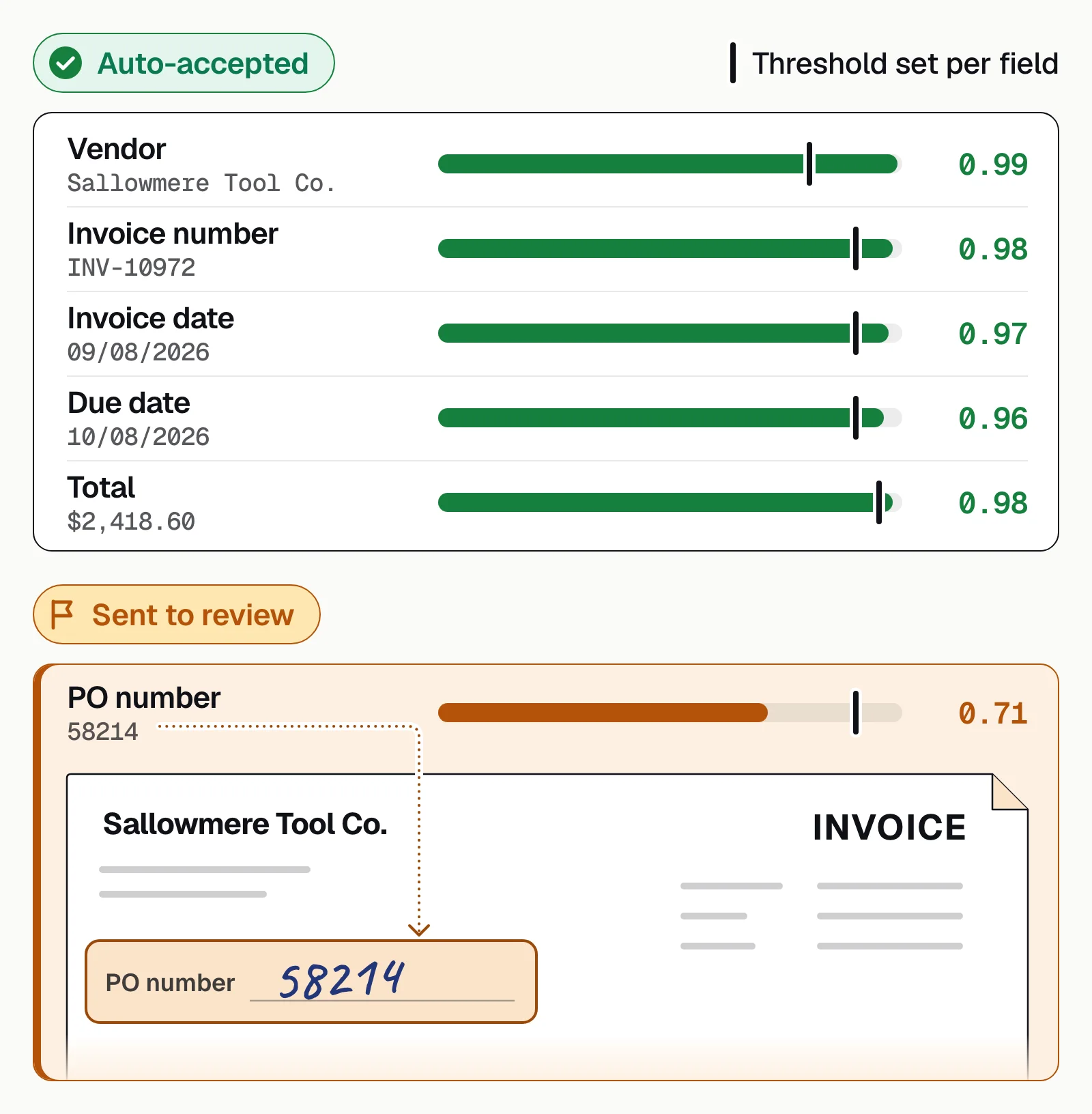
Start with a guess, then adjust weekly from the escalation rate and the errors that still get through: documents change and models drift.
Add business rules for errors the model is confident about
Some costly errors come back with high confidence: a year read as 2024 instead of 2023, or a total that doesn't match its line items. Add rules that flag a document whatever its score:
- The vendor's bank details differ from the vendor master or the last invoice.
- The amount is above an approval limit, or unusual for this vendor.
- Line items don't add up to the total.
- A required field or signature is missing.
These flags join the same queue as low-confidence fields. See exception handling for how to structure them.
Designing the review queue#
A queue needs a size your team can clear, an order that puts risk first, and a view that shows when it's falling behind.
Size it for the peak
Keep the backlog within 2 to 3 days of what reviewers clear, and staff for month-end, not the average day.Prioritize by risk and age
A high-value payment comes before an uncertain phone number, and older items move up.Make it visible
Put queue depth, the oldest item and escalation rate by document type on a dashboard.
To size the team, enter your monthly volume, the documents a person touches and the minutes each takes, then add month-end headroom to the hours it returns.
Your review workload
Straight-through processing (STP) is the share of documents no person touches. Count a document as touched if anyone opened it to fix, check or key a value.
- Straight-through rate
- Hours of hands-on work per month
- Hours per year
How it's worked out
- STP rate = (documents processed − documents touched) ÷ documents processed.
- Hours are touched documents times minutes each. Raising the rate by cutting touches is where the hours come back.
Designing the reviewer screen#
The screen decides whether review works: too little on it and reviewers guess, too much and they skim. Test each version with real reviewers, timing their decisions and checking their accuracy.
- The source next to the valueShow the region of the page the value came from, so the reviewer checks the document, not their memory.
- Confidence and the reason for the flagShow the score and which rule fired.
- ContextThe document type, when it arrived, and earlier decisions on the same vendor or customer.
- Keyboard shortcuts and batch actionsApprove, edit or reject without the mouse, and confirm a set of clean fields at once.
- A second check on high-risk changesA changed bank account shouldn't go through until someone has checked it against the source or a second person has approved it.
Turning corrections into training data#
Every correction is a labeled example. Captured well, corrections bring the escalation rate down; captured badly, they teach the model one reviewer's habits.
- Log every correctionWho, when, the old and new values, and why it was flagged. The log is also your audit trail: proof a person checked the decision.
- Audit a sample of each reviewer's workIf someone is consistently wrong, downweight their corrections and give them more training.
- Retrain from a versioned snapshotKeep corrections in a separate dataset and retrain weekly or monthly from a snapshot, so test data doesn't leak into training.
- Measure before and afterCheck accuracy on a held-out test set before and after retraining, and don't ship a model that didn't improve.
As the model improves, the escalation rate should fall, so people spend their time only on the cases that need them.
Metrics that tell you it's working#
Track these from day one to tune thresholds, size the team and show the review step is worth its cost.
| Metric | What it tells you | Warning sign |
|---|---|---|
| Escalation rate | Share of documents or fields sent to a person | Rising over time, or far above what your team can clear |
| Reviewer accuracy | How often reviewers are right, from expert audits | Falling, or very different between reviewers |
| Review time per item | How long each decision takes | Climbing through a shift (fatigue) or much slower for one reviewer |
| End-to-end accuracy | Accuracy of what reaches downstream systems, after review | Below target even though reviewers are busy |
Common human-in-the-loop design mistakes#
Say a team sends everything below 90% confidence to review, and in week one 40% of invoices land in the queue. Swamped reviewers start approving without reading. The model wasn't the problem; nobody designed the review.
Review bolted on
- One threshold guessed at launch, loosened whenever the queue grows
- Team sized for the average day, on the same queue all shift
- Reviewers see the value but not the source
- Corrections are saved and never used
- Nobody measures reviewer accuracy
Review designed in
- Per-field thresholds tuned weekly from escalation data
- Capacity planned for peaks, with rotation and a priority order
- Every flagged value shown next to its source on the page
- Checked corrections feed scheduled retraining
- Escalation rate, reviewer accuracy and end-to-end accuracy on a dashboard
How Docsumo handles human review#
Docsumo is an intelligent document processing (IDP) platform that extracts fields and tables from documents such as invoices and bank statements, handwritten text included. Any field below the confidence threshold you set for it goes to a reviewer, who clicks the field to see its source line highlighted, and reviewer corrections improve the model. Clean data goes to your systems through the API and webhooks; audit logging is on the Business plan, and cross-document validation and case management are on the Enterprise plan.
What it doesn't do: it's software, not a managed review service, so it doesn't supply reviewers; your own team decides the exceptions.
- 99%field-level accuracy across 250+ document types
- 95%+of documents processed straight through, without manual review
For review inside a full workflow, see accounts payable automation and IDP for lending, or straight-through processing for the other side of the same design.
The bottom line#
Human-in-the-loop is part of the design, not a feature added later. Set a threshold for each field, add rules for the errors the model is sure about, size the queue for your busiest day, show reviewers the source and feed their corrections back. Then tune from escalation rate, reviewer accuracy and end-to-end accuracy.
Book a demo with a batch of your own documents, or start a free trial.
Frequently asked questions#
What is a human-in-the-loop system?
A human-in-the-loop system is an AI workflow with planned points where a person checks, corrects or approves the output. In document processing, the AI extracts the data and scores its confidence, and anything below a threshold or flagged by a rule goes to a reviewer before it reaches downstream systems.
When should I use human-in-the-loop review instead of full automation?
Use full automation for low-risk data that's easy to verify or fix later. Use human review for anything that can cause a financial loss, a compliance breach or harm to a customer, such as payments, claims and loan decisions.
What's the difference between human-in-the-loop and human-on-the-loop?
In a human-in-the-loop system, a person approves or corrects specific items before they go through. In a human-on-the-loop system, the AI acts on its own while a person monitors it and can step in. Document workflows that move money or decide on credit usually need in-the-loop review for exceptions.
What confidence threshold should I start with?
There's no universal number. Start from your accuracy target and how many documents your reviewers can check a day, set stricter thresholds on high-risk fields, then adjust weekly using the escalation rate and the errors that still get through.
Which IDP platforms support human-in-the-loop validation?
Docsumo, our product, supports it, and so do Hyperscience, UiPath IXP and Rossum, which describe human review of exceptions on their own sites. What differs is how review works: look for confidence thresholds per field, a review screen that shows the source next to each flagged value, and corrections that feed back into the model, all three of which Docsumo has. To compare platforms, see the best intelligent document processing software.
Is in-house review cheaper than a managed review service?
It depends on your volume and how many fields your thresholds send to a person. A managed service supplies reviewers and builds their time into its price; with review software, your own team checks only the flagged fields and keeps the decisions in-house. Docsumo is software, not a managed service.
Sources
- Google Cloud: What is human-in-the-loop (HITL) in AI and ML?
- EU AI Act, Article 14: Human oversight
- Hyperscience: Hypercell platform (human-in-the-loop review of exceptions)
- UiPath: IXP and Document Understanding (document validation)
- Rossum: Pricing (validation screen for exception handling and human in the loop)
First published . Last updated .