Automated document redaction: how it detects PII, removes it and where it fails
For operations, compliance and legal teams that share documents full of personal data: how automated redaction finds PII, what US rules ask you to remove, and the mistakes that leave redacted data readable.

Key takeaways
- Automated redaction finds sensitive data in a document, such as Social Security numbers, account numbers and dates of birth, and removes it for good before the file is shared or stored.
- It has two halves: PII detection, where patterns, labels and AI models find each value, and redaction, where the value is blacked out, masked or replaced and the file is flattened.
- A black box drawn over text isn't a redaction: the text stays in the file and can be copied out, and so can metadata such as the author and earlier revisions.
- US rules set what comes out: HIPAA's Safe Harbor method lists 18 identifiers, and federal court filings may show only the last four digits of Social Security and account numbers.
- No detector finds everything, so values the software is unsure about should go to a person, and every redaction should be logged.
On this page
- What is automated redaction?
- Manual vs automated redaction
- How automated redaction works
- How automatic PII detection works
- Redaction methods, and when to use each
- What US rules ask you to redact
- Where automated redaction fails
- How to choose automated redaction software
- How Docsumo handles redaction
- The bottom line
- Frequently asked questions
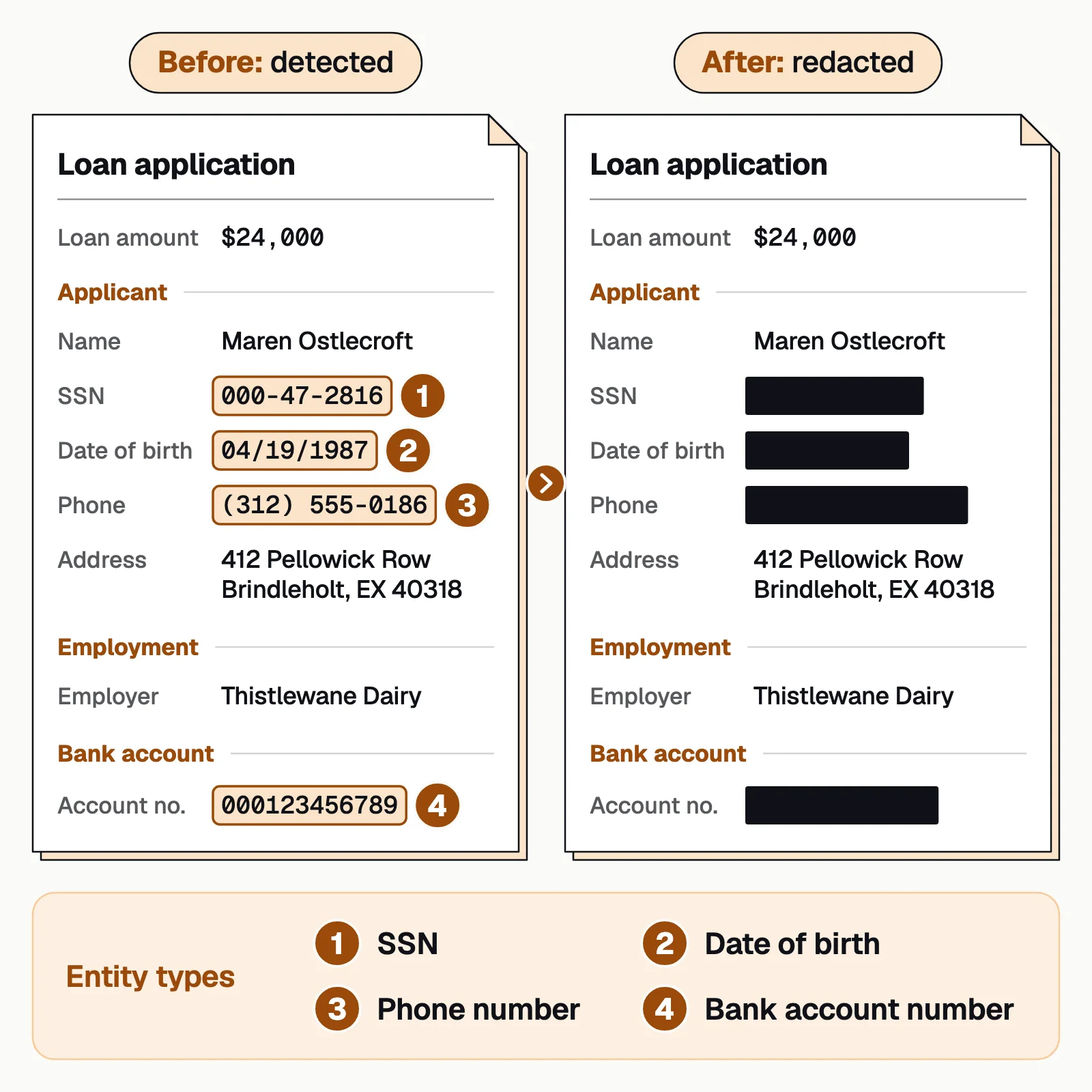
Automated document redaction uses software to find sensitive information in a file, such as Social Security numbers, account numbers and dates of birth, and remove it for good before the file is shared or stored. The software reads every page, scans included, detects each sensitive value (sending the ones it's unsure about to a person), blacks it out or masks it, flattens the file so nothing is left underneath, and logs what it removed. This guide covers how PII detection works, the redaction methods, what US rules ask you to remove, and where automated redaction fails.
What is automated redaction?
Redaction removes information from a document so that no one who receives it can read or recover it. Automated redaction, also called automatic or auto redaction, hands the finding and removing to software, so every page gets the same rules, whether there are 10 pages or 10,000.
The finding step is PII detection. Personally identifiable information (PII) is anything that can distinguish or trace a person's identity, such as a name, Social Security number or biometric record, on its own or combined with other information linked to that person, such as a date and place of birth. That's the federal definition NIST uses.
Manual vs automated redaction
By hand, redaction depends on one person's attention on every page. Software applies the same rules to every page and keeps a record of what it did.
Manual redaction
- A reviewer reads every page and marks values by hand
- Two reviewers apply the same rule differently
- Boxes drawn over text can leave the text in the file
- No record of what was removed, or why
Automated redaction
- Every page, scans included, is checked against the same rules
- People review only the values the software is unsure about
- Values are deleted, the file is flattened and metadata is stripped
- Each redaction is logged: what type, where, which rule and who approved it
How automated redaction works
A well-built pipeline takes a document through five stages, from reading the page to proving what was removed.
- Scanned PDFs
- Digital PDFs
- Email attachments
- Phone photos
- 01Read every page
- 02Detect PII
- 03Review unsure finds
- 04Redact and flatten
- 05Log each redaction
- Read every pageText layers are read directly. Scanned pages and photos go through OCR first, so a value inside an image can be found.
- Detect PIIPatterns, labels and AI models tag each sensitive value with its type (SSN, account number, name) and a confidence score.
- Review unsure findsConfident finds go straight through. A smudged digit or an unusual label goes to a person to confirm.
- Redact and flattenEach value is replaced with a box, a mask or a label, and the file is rebuilt so the original text, hidden layers and metadata are gone.
- Log each redactionThe type of value removed, where it was, under which rule and who approved it, ready for an audit or a dispute. The log shouldn't hold the values themselves.
How automatic PII detection works
Good detection combines several methods, because each one misses values the others catch.
Patterns
Pattern-based redaction uses rules for the shape of a value: NNN-NN-NNNN for an SSN, or a card number that passes the Luhn checksum. The rules are fast and predictable, but they miss values written differently and flag look-alikes such as reference numbers.Labels and context
Words near a value say what it is: "SSN", "DOB", "Acct #", "Member ID". Context also separates a date of birth from a date of service.AI entity recognition
Models trained for named entity recognition find names, addresses and employers in free text, where no pattern applies.Form layout
On a known form, the field says what the value is: the SSN box on a loan application, the TIN box on a W-9.Your own lists
Customer names, account numbers or claim numbers you already hold, matched wherever they appear.
No combination is perfect. In a 2025 study, a detector that combined rules with machine learning reached 94.7% precision but 89.4% recall on synthetic financial documents, so about 1 sensitive value in 10 was missed. That's why unsure finds go to a person, and why you should measure misses on your own files.
Redaction methods, and when to use each
Once a value is found, there are four ways to take it out. The rule you're following usually decides which.
Blackout
A solid box replaces the value and the text underneath is deleted. Use it when the recipient needs none of the value, as in documents released outside the company.Masking
Characters replace the value but keep its shape: XXX-XX-XXXX. Use it when the reader should see that a value was there and what kind it was.Partial redaction
Only the digits a rule allows stay visible, such as the last four of an SSN or account number, or the year of birth. Use it when the recipient has to match a record.Substitution
A label or token replaces the value, such as [SSN-1]. Use it for data sets and analysis, where the same token keeps two people apart without saying who they are.
What US rules ask you to redact
Which values come out depends on the rule you're following. Here are four that lending, insurance, healthcare and legal teams run into.
| Rule | Applies to | What to remove or mask |
|---|---|---|
| HIPAA Safe Harbor (45 CFR 164.514(b)(2)) | Health information a covered entity or business associate wants to treat as de-identified | All 18 identifiers, including names, geography smaller than a state, all dates except the year, phone numbers, SSNs, medical record and account numbers, and full-face photos |
| Federal court filings (Fed. R. Civ. P. 5.2, Fed. R. Crim. P. 49.1) | Parties and nonparties filing with a federal court | All but the last four digits of SSNs, taxpayer IDs and financial account numbers; birth dates except the year; minors' names except initials; in criminal cases, home addresses except city and state |
| PCI DSS Requirement 3.4.1 (PCI SSC FAQ 1492) | Businesses that handle payment card data | Card numbers on screens and reports: no more than the BIN and last four digits shown |
| Gramm-Leach-Bliley Act (FTC) | Financial institutions such as lenders, financial advisers and insurers | No field list: customer data must be safeguarded, and removing what a recipient doesn't need limits what leaves the company |
Rules say what to remove; the document decides where to look. For health data, see what HIPAA compliance means for document teams.
| Document | Sensitive data to look for |
|---|---|
| Loan application | SSN, date of birth, account numbers, income, employer, phone, address |
| Bank statement | Account number, name and address, payee names in transactions |
| Pay stub and W-2 | SSN, employer EIN, pay and tax figures, home address |
| Tax forms (1040, 1099, W-9) | SSN, EIN or ITIN, address, refund bank account on a 1040 |
| Medical records and claims | Patient name, date of birth, member and record numbers, dates of service, diagnoses |
| Driver's license or passport copy | ID number, date of birth, photo, address, barcode or machine-readable zone |
Where automated redaction fails
Redaction fails when a value is found but not really removed, when it's never found, or when too much comes out. Check for each of these before a file leaves the company.
- Text left under the boxA black box drawn over text hides it on screen, but the text stays in the file and can be copied out. One federal court's e-filing guidance warns that highlighting in black or drawing a box in Word or Acrobat doesn't protect the data.
- Metadata and hidden contentThe author's name, file paths, comments, form fields, earlier revisions and the full version of a cropped picture can survive in the file. Strip them, or rebuild the file.
- Values OCR misreadOn a faint scan or a handwritten form, one misread digit breaks the pattern, and a value that isn't read can't be found.
- Labels the rules don't expect"SSN #", "Soc. Sec. No.", or a number with no dashes or split across two lines.
- Values in images, stamps and attachmentsA photo of a driver's license pasted into a PDF, a fax header, an embedded spreadsheet.
- Over-redactionA rule that removes every 9-digit number or every date also takes out invoice numbers and dates of service the recipient needs.
- Inconsistent copiesA name removed on page 1 but not on page 40, or in the PDF but not in the email it was attached to.
How to choose automated redaction software
Ask for a trial on your own documents, then check these five things yourself.
- Test on your own filesInclude scans, faxes, handwriting and long files, not the vendor's clean samples.
- Measure what it missesMark every sensitive value in 50 to 100 pages yourself, then count how many of them the tool found (recall) and how many of its flags were right (precision). In redaction, a miss costs more than a false flag.
- Try to break the outputSearch the redacted file for a value you know was removed, copy the text under a box, and open the document properties. Nothing should come back.
- Check review and loggingUnsure values should go to a person with the spot on the page highlighted, and every redaction should be recorded. See human-in-the-loop review.
- Check securityAsk for SOC 2 Type 2, HIPAA and GDPR compliance, and a BAA if you handle health data.
How Docsumo handles redaction
Docsumo is an intelligent document processing (IDP) platform. It finds sensitive data in documents, such as Social Security and account numbers, and redacts it. It handles any document type and reads handwritten as well as printed text.
Low-confidence fields go to a person for review: you set the confidence threshold for each field, clicking a field highlights its source line in the document, and reviewers' corrections improve the model. Audit logging is on the Business plan, and results reach your systems through the API and webhooks. See Document AI.
Docsumo is SOC 2 Type 2 audited, ISO/IEC 27001:2022 certified, and HIPAA and GDPR compliant, with a BAA and a DPA available, and your documents aren't used to train shared or third-party models. See security. It also extracts the data in the documents above, for lending, insurance and healthcare teams.
What it isn't: an on-premise product (it runs in the cloud only) or a desktop tool for editing PDFs. Which values a rule requires you to remove stays a call for your compliance or legal team.
The bottom line
Automated redaction is two jobs: finding every sensitive value, and removing it so nothing can be recovered. Start from the rule you're redacting for, test detection on your own documents, check that the output file is really clean, and keep a person on the values the software is unsure about.
Book a demo with a few of your own documents, or start a free trial.
Frequently asked questions
What is PII detection?
PII detection is the step that finds personally identifiable information in a document, such as names, Social Security numbers, account numbers and dates of birth. It combines patterns, nearby labels and AI entity models, and it's the first half of automated redaction. Secrets detection is the same idea applied to passwords and API keys in code and logs.
Can I use AI to redact a document?
Yes. AI entity models find names, addresses and other PII that fixed patterns miss, and redaction software removes what they find. Check the output yourself: the text must be gone from the file, not just covered, and values the model is unsure about should go to a person.
How do you redact a PDF automatically?
Run it through software that reads every page (with OCR for scanned pages), detects the sensitive values, replaces them with boxes or masks, and saves a flattened copy without the hidden text or metadata. Then search the output for a value you know was removed. It shouldn't be found.
What is the difference between redaction and masking?
Redaction removes a value from the document, usually leaving a black box. Masking replaces some or all of its characters, as in XXX-XX-6789, so the reader can tell what kind of value was there and, with partial masking, match the last digits.
What is the difference between PII and PHI?
PII is any information that can identify a person. PHI (protected health information) is health information that HIPAA protects because it identifies the patient or could be used to, such as a diagnosis next to a patient's name. Under HIPAA's Safe Harbor method, health data counts as de-identified once all 18 listed identifiers are removed and you have no actual knowledge that what's left could identify the person.
Does Docsumo redact documents?
Yes. Docsumo finds sensitive data such as Social Security and account numbers in documents and redacts it. Low-confidence fields go to a person for review, and Docsumo is SOC 2 Type 2 audited and HIPAA and GDPR compliant. See security.
Sources
- NIST CSRC Glossary: personally identifiable information (PII)
- 45 CFR 164.514: HIPAA de-identification, Safe Harbor identifiers (Cornell LII)
- 45 CFR 160.103: definition of protected health information (Cornell LII)
- Federal Rules of Civil Procedure, Rule 5.2: privacy protection for filings (Cornell LII)
- Federal Rules of Criminal Procedure, Rule 49.1: privacy protection for filings (Cornell LII)
- PCI Security Standards Council: FAQ 1492, PAN masking (Requirement 3.4.1) and truncation
- FTC: Gramm-Leach-Bliley Act
- U.S. District Court, Western District of Louisiana: personal identity and metadata redaction techniques for e-filing
- Mishra, Pagare and Sharma: A hybrid rule-based NLP and machine learning approach for PII detection and anonymization in financial documents (Scientific Reports, 2025)
First published . Last updated .