Automated invoice processing: how it works, its benefits and how to set it up
For AP managers and controllers planning to automate. See the workflow for PO and non-PO invoices, the business case and a rollout plan that avoids the usual problems.

Key takeaways
- Automated invoice processing uses software to capture, validate, match, route and post supplier invoices, so people only handle exceptions.
- The workflow differs for PO invoices (matched to the purchase order and receipt) and non-PO invoices (coded and routed by rules or history).
- Invoices that pass every check can reach approval with no one touching them. Track that share as your touchless rate.
- The benefits of automated invoice processing are easiest to prove on cost. A sponsored analyst report from Ardent Partners puts the average cost to process an invoice at $9.84. Top-performing AP teams process invoices at 79% lower cost and 79% faster than their peers.
- Roll out in phases, capture first, then validation and matching, then approvals and posting, and track touchless rate, exceptions by reason and cost per invoice.
On this page
- Manual vs automated invoice processing
- The automated invoice processing workflow
- Checks every invoice should pass
- Touchless invoice processing
- What to automate first
- Benefits of automated invoice processing
- KPIs to track
- A phased rollout plan
- How to choose invoice automation software
- If your AP team still keys every invoice
- Frequently asked questions
Automated invoice processing uses software to handle supplier invoices from receipt to posting. The software captures each invoice and extracts the data. It checks the data against purchase orders, receipts and vendor records. Then it routes the invoice for approval and posts it to the ERP. People step in only when an invoice fails a check. The result is a lower cost per invoice, faster cycle times and fewer wrong or duplicate payments.
Manual vs automated invoice processing#
Automation isn't just scanning. Basic OCR turns an image into text; an invoice automation system also validates, routes and posts the data, which is what removes the manual work.
Manual invoice processing
- Someone downloads PDFs from the AP inbox and portals
- Invoices are typed into the ERP field by field
- Spot checks, if there's time
- PDFs are forwarded by email for approval
- Status lives in inboxes and spreadsheets
Automated invoice processing
- Every channel feeds one queue
- OCR and AI models extract the data, line items included
- Every invoice is checked for duplicates, vendor match, math and PO match
- Approvals go to the right approver automatically
- One queue shows status, with an audit trail of who approved what and when
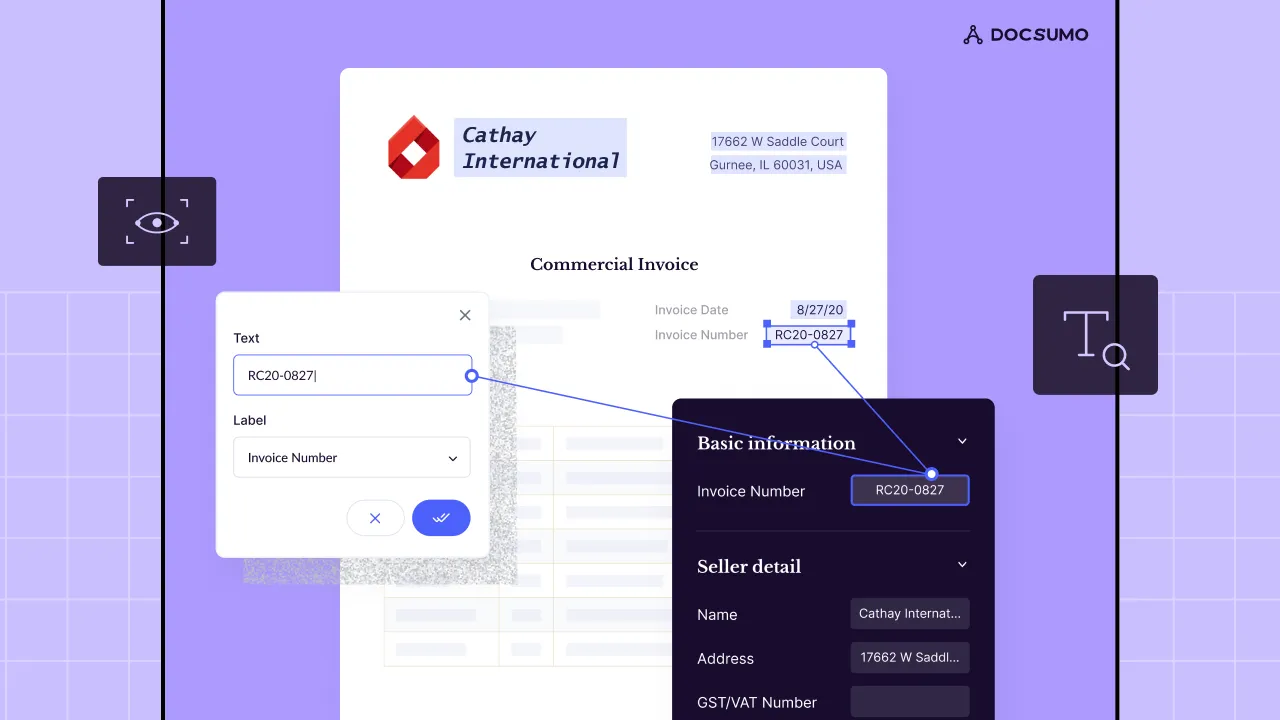
Extraction removes the biggest manual task, which is keying. Every field on the invoice, line items included, comes out as data.
| Field | Extracted value | Read |
|---|---|---|
| Vendor name | Northeast Kitchen Equipment | |
| Invoice number | NKE-9921 | |
| Invoice date | 2026-08-12 | |
| Due date | 2026-09-11 | |
| Payment terms | Net 30 | |
| PO number | 5498 (handwritten) |
| Field | Extracted value | Read |
|---|---|---|
| Vendor address | 37 Bridge St, Westbrook, ME | |
| Bill to | Harbor Street Bakery LLC | |
| Ship to | 22 Thames St, Portland, ME | |
| Remit to | PO Box 3170, Portland, ME |
| Field | Extracted value | Read |
|---|---|---|
| Item code | WT-3072 | |
| Description | Stainless work table, 30 x 72 in | |
| Quantity | 2 | |
| Unit of measure | EA | |
| Unit price | 385.00 | |
| Amount | 770.00 |
| Field | Extracted value | Read |
|---|---|---|
| Subtotal | 23,250.00 | |
| Sales tax rate | 5.5% | |
| Sales tax | 1,278.75 | |
| Freight | 121.25 | |
| Total due | 24,650.00 |
The automated invoice processing workflow#
Every invoice goes through the same pipeline. PO invoices are matched; non-PO invoices are coded. Anything that fails a check leaves the pipeline for a person.
- Email inbox
- Supplier portals
- EDI and e-invoices
- Scanned paper
- 01Capture and classify
- 02Validate
- 03Match or code
- 04Approve
- ReceiveInvoices arrive by email, supplier portal, EDI or e-invoice, and paper mail that's scanned. Automation starts by pulling every channel into one queue.
- Capture and classifyThe system separates invoices from credit memos, statements and attachments, splits multi-invoice PDFs, and extracts header fields and line items. Invoices are one of the 250+ document types Docsumo reads with 99% field-level accuracy.
- ValidateEvery invoice is checked before anyone sees it. The checks cover the vendor, duplicates, math, required fields and dates, as the checklist below shows.
- Match or codePO invoices are matched to the purchase order (2-way) and the goods receipt (3-way), within tolerances you set. See 2-way vs 3-way matching. Non-PO invoices, such as utilities, services and subscriptions, are coded to GL accounts and cost centers by rules or by the vendor's history.
- ApproveClean PO invoices that match within tolerance can be auto-approved. Others go to the approvers your approval policy names, for example by amount or department.
- Post and payApproved invoices post to the ERP or accounting system through integrations. They're scheduled for payment on terms, or early if there's a discount worth taking.
- Handle exceptionsAnything that fails a check goes to an AP specialist, with the reason and the field highlighted on the invoice. Common reasons are a price variance, a missing receipt, an unknown vendor or a low-confidence field.
Checks every invoice should pass#
- The vendor is realThe vendor exists in the vendor master and the remit-to bank details match.
- It isn't a duplicateSame vendor, number and amount haven't been paid before. See duplicate invoice detection.
- The math adds upLine items, tax and totals reconcile.
- Required fields are presentInvoice number, dates, PO number where needed, and dates that make sense.
- It matches the PO and receiptQuantities and prices fall within your tolerances before auto-approval.
Touchless invoice processing#
Docsumo processes 95%+ of documents straight through, without manual review, and Valtatech processes 99%+ of the supplier invoices it handles touchless with it. When an invoice also passes every matching check and approval rule, it can reach approval with no one touching it. Our guide to touchless invoice processing shows how to measure the touchless rate and where the invoices that stop should go.
What to automate first#
Start with automated invoice capture. It takes the least effort and removes the most manual work. Then add the checks and matching that make touchless processing possible.
| Step | Effort to automate | Impact |
|---|---|---|
| Capture and extraction | Low | Removes keying, the biggest manual task |
| Duplicate and vendor checks | Low | Stops the costliest errors: duplicate and misdirected payments |
| PO matching | Medium | Enables touchless processing for PO invoices |
| Non-PO coding | Medium | Cuts back-and-forth with approvers |
| Approval routing | Medium | Shortens cycle time, captures discounts |
| ERP posting | Medium to high, depending on the ERP | Removes the last rekeying step |
Benefits of automated invoice processing#
The benefits of automated invoice processing start with a lower cost per invoice and faster cycle times. You also get fewer errors and duplicate payments, a full audit trail and more early-payment discounts. Cost is the easiest to prove. Ardent Partners' State of ePayables 2025, a sponsored analyst report, puts the average cost to process an invoice at $9.84. Top-performing AP teams process invoices at 79% lower cost than their peers.
What invoice processing costs you
Put in your own numbers. The cost and exception-rate defaults are the 2025 averages across AP teams.
- Cost today, per month
- Cost with automation, per month
- Difference per month
- Difference per year
How it's worked out
- Cost today is invoices per month times the cost of one invoice.
- With automation, an invoice that still needs a person costs what it costs today, and the rest cost only the software.
- It leaves out late-payment fees and missed early-payment discounts, which usually make the gap bigger.
Source: Ardent Partners, State of ePayables 2025: AP benchmarks (sponsored analyst report, Jan 2026)
Cycle time matters too. An invoice takes 8.2 days to process on average, and top-performing teams are 79% faster. Faster approval is what makes early-payment discounts and better supplier terms possible.
To build your own case, add up the labor saved, the errors and duplicate payments avoided and the early-payment discounts captured. Then subtract the cost of software, implementation and integration. Measure the baseline before you start, or you won't be able to show the gain.
- <5 minper document, down from 2+ hours
- 65%+lower costs at Valtatech
KPIs to track#
Touchless rate
Share of invoices processed with no human touch.Exception rate by reason
No PO, price variance, missing receipt, unknown vendor, low confidence.Cycle time
Receipt to approval, and receipt to payment.Cost per invoice
AP cost divided by invoices processed.Duplicates caught
Duplicate and erroneous payments stopped before they go out.Discounts captured
Early-payment discounts taken, as a share of those offered.
See accounts payable metrics and benchmarks for more.
A phased rollout plan#
- BaselineMeasure volumes by channel, share of PO invoices, cycle time, exception reasons and cost per invoice.
- Clean the vendor masterRemove duplicates and stale bank details, and put bank-detail changes behind a verification call. Bad vendor data breaks automation.
- Phase 1: captureRoute all invoices into one queue and extract them. Measure field-level accuracy on your own invoices.
- Phase 2: validation and matchingAdd duplicate, vendor and math checks, then PO matching with tolerances that start strict.
- Phase 3: approvals and postingConfigure routing, keep approvals separate from vendor setup and payment release, and connect the ERP. Map fields and test posting on a sandbox company first.
- Widen touchless rulesRelax tolerances as accuracy and match rates hold, push for purchase orders on more invoices, and fix the top exception reason each month.
How to choose invoice automation software#
There are four main types of tool. Pick the type first, then the vendor.
ERP-native AP modules
Best for low invoice variety and modest volumes, where tight ERP integration matters most. Watch for limited flexibility on unusual layouts and complex line items.Standalone AP automation platforms
Best for teams that want capture, approvals and payments in one AP tool. Extraction quality varies, so test on your own invoices.Intelligent document processing (IDP)
Best for high volumes of varied invoices, and checks across other documents such as contracts and receipts. Needs an ERP or AP system to post into.RPA bots
Best for moving data between systems that have no API. They break when screens or invoice layouts change.
Whichever type you look at, test it on your worst invoices, such as multi-page ones, long line-item tables, poor scans and handwritten notes. Also check for rules finance can change without IT, an API and webhooks, SOC 2 Type 2 with audit logs, and a test environment. We'd pick a tool you can set up around your own checks and approval rules. Your team shouldn't have to change how it works to suit the software.
Docsumo, our product, is the IDP layer. It reads and checks invoices and flags duplicates. On the Enterprise plan, it also matches invoice lines to the purchase order and receipt (2-way and 3-way matching). On the Business plan, it routes invoices for approval by the rules you set. It sends the data to your ERP through its API and webhooks; it doesn't pay suppliers. For the full picture, see accounts payable automation and AP process automation.
If your AP team still keys every invoice#
Start with capture and the checks that stop bad payments. Then measure the touchless rate and the exceptions, and widen automation as the numbers hold. Every invoice should go through the same pipeline, with people handling only the exceptions.
Book a demo with a batch of your own invoices, or start a free trial.
Frequently asked questions#
What is automated invoice processing?
It's the use of software to handle supplier invoices from receipt to posting. The software extracts the invoice data and checks it against purchase orders, receipts and vendor records. Then it routes the invoice for approval and posts it to the ERP, leaving only exceptions for people.
What are the benefits of automated invoice processing?
Lower cost per invoice, faster cycle times, fewer keying errors and duplicate payments, an audit trail of who approved what, and more early-payment discounts captured. The AP team spends its time on exceptions instead of data entry.
What is the average cost to process an invoice?
Ardent Partners' State of ePayables 2025, a sponsored analyst report, puts the average at $9.84 per invoice. Top-performing AP teams process invoices at 79% lower cost than their peers. Measure your own cost per invoice (AP cost divided by invoices processed) before you automate, so you can show the gain.
What is touchless invoice processing?
It's when an invoice passes every check and reaches approval with no one touching it. For touchless rates and the reasons invoices stop, see our guide to touchless processing.
Does automated invoice processing handle e-invoices?
Most platforms accept structured e-invoices (such as XML or EDI) alongside PDFs and scans, so every invoice ends up in the same workflow. Check the formats your suppliers send.
Can automated invoice processing handle poor scans and handwritten notes?
Many AI-based tools can, but results vary by platform. Docsumo reads handwritten as well as printed text. Test any tool on your hardest invoices before you buy.
What security certifications should invoice automation software have?
Look for SOC 2 Type 2 as a baseline, plus GDPR if you have EU data and HIPAA if invoices carry health information. Docsumo holds SOC 2 Type 2, HIPAA and GDPR compliance and ISO/IEC 27001 certification.
Sources
First published . Last updated .