OCR accuracy: how to measure it, what affects it and how to improve it
For operations, data and engineering teams evaluating OCR or document AI: the metrics that matter, a worked example with code, the factors that lower accuracy, and the fixes that raise it.

Key takeaways
- OCR accuracy is measured with character error rate (CER) and word error rate (WER), both based on the number of edits that turn the correct text into the OCR output.
- A widely quoted rule of thumb calls 98 to 99% accuracy good for printed text. Handwriting and poor scans score much lower, and any figure means little until you know what it counts.
- For business documents, field-level accuracy matters more than character accuracy, and errors compound. At 98% per field, all 20 fields on a document are right only about 67% of the time.
- The biggest drivers are image quality (resolution, contrast, skew, noise), fonts and handwriting, and layout complexity.
- Accuracy improves with preprocessing, better models, validation rules and human review of low-confidence fields, with corrections fed back into the model.
On this page
OCR accuracy, often called OCR quality, is how closely the text produced by optical character recognition matches the text actually on the page. It's measured with character error rate (CER) and word error rate (WER), which count the edits needed to turn the correct text into the OCR output. For business documents such as invoices or bank statements, the measure that matters is field-level accuracy. Each extracted value, like a total or an account number, has to be exactly right.
This guide works through each metric with an example and code, what counts as high-accuracy OCR, the factors that lower accuracy, and the practical ways to raise it.
How OCR works, and where errors come from#
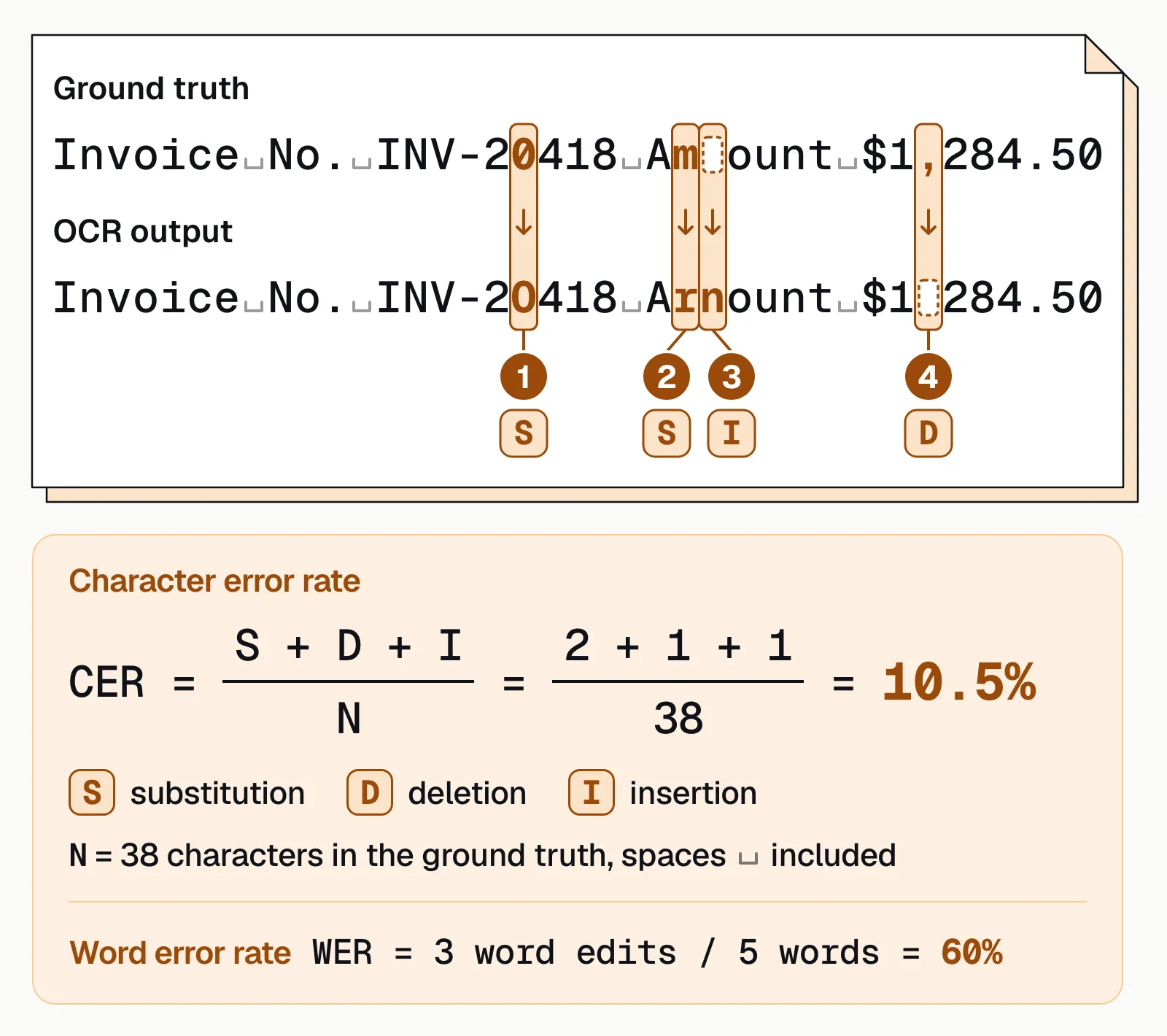
Take the invoice line this post scores later, "Invoice No. INV-20418 Amount $1,284.50." Every OCR engine pushes a page image through the same four stages, and that one line shows where each can go wrong.
- Scanned pages
- Phone photos
- Image PDFs
- 01Preprocess the image
- 02Analyze the layout
- 03Recognize each line
- 04Correct with language context
Preprocessing straightens and cleans the scan before anything is read; skip it on a skewed page and line detection breaks before recognition even starts. Layout analysis has to decide that the amount sits in its own column rather than folded into the line above it, the kind of call that goes wrong on a table split across a page.
Recognition is where this particular line came unstuck. Modern engines read whole lines with neural networks (Tesseract has used LSTM models since version 4), but the invoice number still came back as "INV-2O418" (an O for a 0) and the amount as "Arnount $1284.50" (rn read as m, and a dropped comma), the four edits this guide scores further down at 10.5% CER and 60% WER. Language-context correction is the stage built to catch exactly that kind of look-alike error before it reaches your system.
How to measure OCR accuracy#
Three metrics cover it, two for the text and one for the data.
Character error rate (CER)
CER counts the characters the OCR got wrong (substitutions S), dropped (deletions D) or added (insertions I), and divides them by the number of characters N in the ground truth, giving CER = (S + D + I) / N. The smallest count of edits that explains the difference is the Levenshtein distance, and character accuracy is 1 minus CER.
Word error rate (WER)
WER applies the same count to whole words, so one wrong character makes the whole word wrong. In the line above, three of the five words contain an error, so WER is 3 / 5 = 60%, against a CER of 10.5%. On the same text, WER is usually the harsher number.
Calculating CER and WER in Python
This function computes both, using only the standard library (Python 3.8+).
def levenshtein(a, b):
    """Minimum number of insertions, deletions and substitutions to turn a into b."""
    prev = list(range(len(b) + 1))
    for i, ca in enumerate(a, 1):
        curr = [i]
        for j, cb in enumerate(b, 1):
            curr.append(min(prev[j] + 1,                 # deletion
                            curr[j - 1] + 1,             # insertion
                            prev[j - 1] + (ca != cb)))   # substitution
        prev = curr
    return prev[-1]

def cer(truth, ocr):
    return levenshtein(truth, ocr) / len(truth)

def wer(truth, ocr):
    return levenshtein(truth.split(), ocr.split()) / len(truth.split())

truth = "Invoice No. INV-20418 Amount $1,284.50"
ocr = "Invoice No. INV-2O418 Arnount $1284.50"
print(f"CER: {cer(truth, ocr):.1%}")   # CER: 10.5%
print(f"WER: {wer(truth, ocr):.1%}")   # WER: 60.0%
Field-level accuracy
For document automation, the question is whether each field is right. Field-level accuracy is the share of extracted fields that exactly match the ground truth. Track precision (how many extracted values are correct) and recall (how many required values were found) alongside it.
Errors compound across a document. If each of 20 fields is right 98% of the time, independently, all 20 are right on only about 67% of documents (0.98 to the 20th power). So track document-level accuracy, the share of documents with every field right, next to field-level accuracy, for each document type.
What counts as high-accuracy OCR?#
There's no universal threshold. A widely quoted rule of thumb comes from a 2009 study of large newspaper digitization programs (Holley, D-Lib Magazine).
| Rating | OCR accuracy | Share of text wrong |
|---|---|---|
| Good | 98 to 99% | 1 to 2% |
| Average | 90 to 98% | 2 to 10% |
| Poor | Below 90% | More than 10% |
Even that study found no agreement on whether such percentages meant characters or words, and that's still the trouble with most accuracy claims. Ask these four questions before you compare two numbers.
- Characters, words or fields?99% of characters read correctly can still mean a wrong invoice total.
- Whose documents?Clean samples score higher than your scans, phone photos and handwriting.
- Per field or per document?Document-level accuracy is usually the lower number.
- Before or after human review?A figure that includes people correcting the output measures the process, not the engine.
The only number that predicts your results is one measured on your own files. Label 100 to 200 representative documents, including your worst scans, run each engine or setting on the same set, and score CER for the text and field-level accuracy for the data. Then count the documents that would still need a person, because that's where the cost is. Our 2025 OCR benchmark on 120 documents judged both the text and the fields. Reviewers preferred Docsumo's text output on 116 of 120, and when GPT-4o pulled key-value pairs from each system's output, it got 84.8% right from Docsumo's.
Factors that affect OCR accuracy#
Seven things decide most of the result, and the first two are about the image, not the engine.
Source document quality
Faded print, stains, folds, low-contrast or colored ink, stamps and handwriting over text.Scan or photo quality
Low resolution, blur, skew, shadows, glare and compression artifacts. Around 300 DPI is the usual recommendation for printed text.Fonts and size
Unusual, decorative or very small fonts are harder to read.Handwriting
Far more variable than print; it needs models trained on handwriting.Language and characters
The engine needs the right language models, including diacritics and symbols.Layout
Multi-column pages, tables, forms with boxes and lines, and rotated text can break reading order.The engine itself
Modern neural and layout-aware models outperform older pattern-matching engines, especially on messy documents.
How to improve OCR accuracy#
Most OCR optimization happens before and after the engine runs. Work through these in order; each step is cheaper than the next.
- Improve the inputScan at 300 DPI or more, flat and straight, in good light. For phone capture, check for blur before the user submits.
- Preprocess the imageDeskew, dewarp phone photos, remove noise, boost contrast on faded pages, and use adaptive binarization when the background is uneven, since one global threshold struggles with shadows and stains. See image enhancement.
- Use the right modelPick engines trained on documents like yours, with handwriting support if you need it. Layout-aware models handle tables and forms far better than plain OCR, and fine-tuning on your own labeled samples helps with unusual fonts or forms.
- Correct with contextLanguage models, dictionaries and master lists fix likely errors. A total read as "1O00" should be 1000, and "APPLE INV" should match "APPLE INC" in your vendor list.
- Validate the fields, not just the charactersLine items should add up to the total, each statement transaction should move the running balance correctly, and a routing number has 9 digits.
- Send uncertain fields to peopleSet stricter confidence thresholds for fields that move money, such as totals and account numbers, than for notes. Show reviewers each value next to its place on the page, and feed their corrections back into the model. See human-in-the-loop review.
Many character errors are look-alikes, and each has a rule that catches it.
| OCR reads | Instead of | Caught by |
|---|---|---|
| O or o | 0 | Digits-only format rules for amounts, account numbers and ZIP codes |
| l or I | 1 | The same format rules, plus check digits where the number has one |
| S, B or Z | 5, 8 or 2 | Format rules and totals that must reconcile |
| rn | m | Dictionaries and master lists, such as vendor names |
| 128450 | 1,284.50 | Line items that must add up to the total |
| A Cyrillic о, which looks identical | The Latin o | Character-set rules on names and IDs |
From OCR accuracy to document accuracy#
OCR only reads characters, and templates built on top of it break whenever a layout changes. No single step makes a document reliable on its own. Intelligent document processing combines text and layout models to find fields in any layout, validates them and routes exceptions to people.
Template OCR
- Reads characters; fields come from fixed page positions
- A new layout means a new template
- A misread digit goes straight into your system
- Accuracy is measured per character, not per field
Intelligent document processing
- Finds fields by text and layout, in any layout
- New layouts are handled by models trained on many variations
- Validation rules and confidence scores catch misreads
- Low-confidence fields go to a reviewer before anything is posted
That's how Docsumo reads bank statements, invoices and any other document type, printed or handwritten, with pre-trained models for 250+ types. Low-confidence fields go to a reviewer, with thresholds you set per field; clicking a field highlights its source line, and corrections improve the model. On bank statements, Docsumo also checks each transaction against the statement's running balance.
- 99%field-level accuracy across 250+ document types
- 95%+of documents processed straight through, without manual review
- 3,000+hours a month saved on insurance compliance documents at Arbor
Read more customer stories, or compare approaches in IDP vs OCR.
The accuracy number that matters is your own#
We'd trust your own correction rate over any vendor's accuracy claim, ours included. A benchmark is scored on someone else's documents, in someone else's way. What predicts your result is the share of fields your reviewers still touch on your own files over a real month of volume.
Measure OCR with CER and WER, but judge document automation on field-level accuracy and straight-through processing, on your own documents. Most accuracy gains come from better input images, layout-aware models, validation rules and a review loop that learns from corrections.
Book a demo and measure field-level accuracy on your own documents, or start a free trial.
Frequently asked questions#
What is a good OCR accuracy rate?
For clean printed text, 98 to 99% (1 to 2% of the text wrong) is the usual benchmark for good OCR; handwriting and poor scans score lower. Whether 95% is good depends on the field. It's fine for sorting documents, not for account numbers, where one wrong digit breaks the record. For business documents, measure field-level accuracy.
Is OCR 100% accurate?
No. Even strong engines misread some characters, often look-alikes such as 0 and O or 1 and l, and errors rise on poor scans, small print and handwriting. Production systems catch them with format rules, totals that must reconcile and human review of low-confidence fields.
How is OCR accuracy calculated?
Count the minimum number of character insertions, deletions and substitutions needed to turn the correct text into the OCR output (the Levenshtein distance), then divide by the number of characters in the correct text. That's the character error rate; accuracy is 1 minus CER.
What is a character error in OCR?
A character error is one wrong, missing or extra character in the OCR output, whether a substitution (O read for 0), a deletion (a dropped digit) or an insertion (an extra space or mark). Character error rate adds them up and divides by the number of characters in the correct text. Character error correction catches them afterward with format rules, dictionaries, language models and human review.
What DPI is best for OCR?
300 DPI is the usual recommendation, and Tesseract's documentation says it works best on images of at least 300 DPI. Very small text can benefit from higher resolution; much lower resolution usually hurts accuracy.
What is the difference between OCR accuracy and extraction accuracy?
OCR accuracy measures whether characters were read correctly. Extraction accuracy measures whether the right value ended up in the right field, such as the invoice total. You can have perfect OCR and still extract the wrong number.