Using GPT-4 for PDF Data Extraction: A Step-by-Step Guide
This article covers the importance of PDF extraction, current methods for PDF data extraction and their limitations, and how GPT-4 can be used to perform question-answering tasks for PDF extraction. It provides a step-by-step guide for implementing GPT-4 for PDF data extraction and discusses the benefits of using GPT-4 and ChatGPT APIs.

Key takeaways
- PDF data extraction with GPT-4 pairs a text extraction step (OCR or an ML model) with retrieval: chunks of the PDF are embedded, stored in a vector database and matched to each question.
- The three common extraction methods are OCR, templates (regex and position rules) and machine learning models such as LayoutLM. Each pulls out text without knowing whether it's correct.
- GPT-4 answers from the retrieved chunk plus the user's question, with an instruction to answer only from the document.
- For production, an intelligent document processing platform adds validation and human review, so errors are caught before data reaches other systems.
On this page
PDF data extraction with GPT-4 works by pulling the text out of the PDF with OCR or a machine learning model, splitting it into chunks and storing each chunk's embeddings in a vector database. When a user asks a question, you find the chunk whose embeddings are closest to the query and give that chunk and the question to GPT-4, which returns the answer. This guide covers the current PDF extraction methods and their limits, then walks through that setup step by step.
What is PDF extraction?#
PDF data extraction is the process of extracting text, images, or other data from a PDF (Portable Document Format) file. These files are widely used for sharing and storing documents, but their content is not always easily accessible.
Why is PDF extraction important?#
Accessibility and readability of PDF files are very necessary for those who have vision issues or have trouble reading small or blurred text, useful for legal situations, data analysis, and research. Some instances where extraction is required include using text or image content from PDF files in other documents to save time and avoid mistakes.
What are the current methods for PDF data extraction and their limitations?#
There are many PDF extraction techniques and tools. Here are the 3 most common, with examples of each:
1 : OCR Technique
OCR or abbreviation for `Optical Character Recognition` can be used to extract text from a variety of sources, including scanned documents, images, and PDF files, and is commonly used to digitize printed documents such as books, newspapers, and historical documents.
Some of the popular OCR tools includes:
2 : Templates
Template-based techniques take into consideration the style of the document PDF and use hard-coded rules. These techniques generally work on structured documents, whose structure remains constant and are easy to understand.
Some of the popular template-based techniques include:
Using regex pattern
Ex: date can be extracted by the following regex rule:
[dd-mm-yyyy or yyyy-mm-dd] - [0-9]{2,4}/[0-9]{2}/[0-9]{2,4}
Hard-Coding rules based on the position of texts and dimensions of the documents
3 : Machine Learning Techniques
Machine Learning (ML) techniques are considered one of the best methods for PDF extraction because it allows for highly accurate text recognition and extraction from PDF files regardless of the file structure. These models can store information of both the `layout` and the `position of the text` keeping in mind the neighboring text too. This helps them to generalize better and learn document structure more efficiently.
What are LLMs
Large Language Models are a subset of artificial intelligence that has been trained on vast quantities of text data. For example, ChatGPT is trained on large amounts of text to produce human-like responses to dialogue or other natural language inputs.
In order to produce these natural language responses, LLMs make use of deep learning models, which use multi-layered neural networks to process, analyze, and make predictions with complex data.
Some popular ML models include:
Limitations of ML models
One major issue that this type of model faces is that they can just extract out the information from the PDF without knowing whether the extraction is actually accurate and correct. The extracted text can also put one key's value under another key. Adding context helps reduce those errors.
To solve this problem and add context to PDF extraction, we can use GPT-4.
What’s GPT-4 and ChatGPT?#
GPT-4 and GPT 4 with vision (Generative Pre-trained Transformer 4) is a large language model developed by OpenAI that uses deep learning techniques to generate human-like natural language text. OpenAI hasn't published GPT-4's size: its technical report withholds architecture details, including model size. (The 175 billion parameter figure often quoted is GPT-3's.)
Chat-GPT, on the other hand, is a variant of GPT that has been specifically trained for conversational AI applications. It has been fine-tuned on a large dataset of conversational data and can generate human-like responses to user queries. Chat GPT can be used for a variety of applications, including chatbots, customer service, and virtual assistants.
Next, the problem statement and how GPT-4 and ChatGPT can help solve PDF extraction.
Problem Statement#
The challenge of efficiently extracting specific information from a collection of PDFs is one that many applications and industries encounter regularly. Extracting information from bank statements or tax forms is tough. The old-fashioned way of manually scanning through numerous PDFs takes a lot of time and can produce inaccurate or inconsistent data. Moreover, unstructured data found in PDFs makes it challenging for automated systems to extract the necessary information.
We intend to solve the problem of finding the answer to user’s questions from the PDF with little manual intervention.
Solution#
We can use embeddings and GPT-4 together:
Generate document embeddings as well as embeddings for user queries.
Identify the document that is the closest to the user's query and may contain the answers using any similarity method (for example, cosine score), and then,
Feed the document and the user's query to GPT-4 to discover the precise answer.
Implementation#
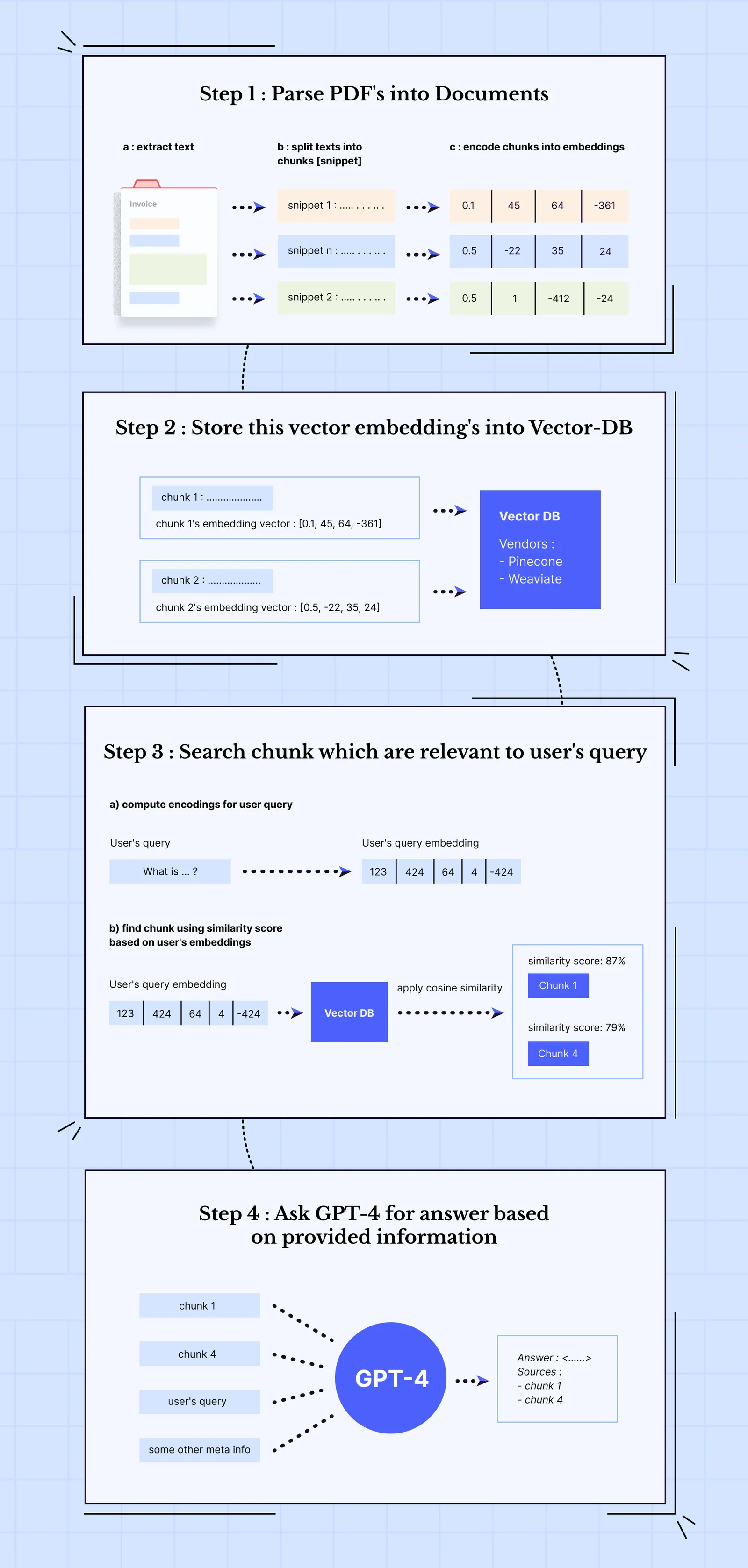
Step 1 : Parse PDF
A: Extract text from the PDF
You can use any of the OCR or ML techniques to extract text from the document
B: Split the text into proper smaller chunks based on structure of the document
Using the coordinate information of Bounding-Box [x0, y0, x2, y2] where x0 and y0 are the top-left coordinates and x2 and y2 are the bottom-right coordinates, you can break the entire text into smaller chunks of certain width and height.
C: Encode those chunks into Embeddings [ either use OpenAI Embeddings or HuggingFace ]
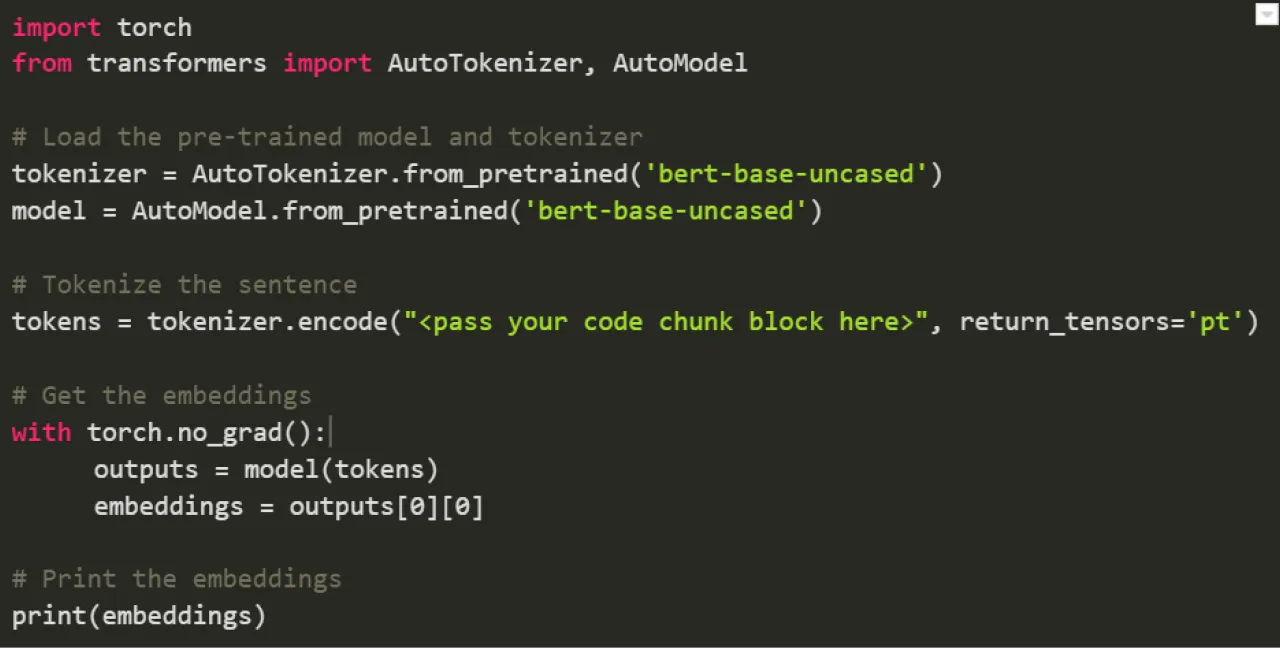
Step 2 : Storing the vector embeddings in a Vector Database
What is a Vector DB and why is it necessary?
Vector databases are purpose-built DB to handle the unique structure of vector embeddings. They index vectors for easy search and retrieval by comparing values and finding those that are most similar to one another. Examples include Pinecone and Weaviate.
This V-DB contains vectors of each chunk snippets and document itself
Step 3 : Search chunk snippet that is relevant to the input query
A: Compute embeddings for user’s query
Use the same technique as mentioned above to compute the embeddings
B: Search chunk embedding vector from the vector database whose embeddings closely match with user query’s embeddings
You could use any of the `similarity search algorithm`.
You could use Semantic Sentence Similarity of sentence transformer library

Step 4 : Ask GPT-4 for answer based on the chunk snippet provided and user query
A: Provide 3 inputs.
Input1 : User query
Input2 : The chunk which closely resembled the query
Input3 : Some Meta-Instructions if any [ System : Answer questions solely based on the information provided in the document ]
B: GPT-4 outputs the answer
Benefits of using GPT4 & ChatGPT APIs?#
GPT-4 has a large context window, so the retrieved chunk, the question and your instructions fit in a single prompt, and it answers from that context rather than from a template.
The ChatGPT API can be called from any programming language, which helps with the downstream tasks.
What did we learn?#
We learnt about the different PDF and data extraction techniques and tools
What are the limitations of these kinds of modules and models
What and how is ChatGPT and GPT-4 helpful in our use case and how they can be used to solve data extraction from PDFs
For production workloads, an intelligent document processing platform adds validation and human review on top of LLM extraction, so errors are caught before data reaches downstream systems.
Frequently asked questions#
Can GPT-4 read PDFs?
A common setup extracts the PDF's text first, splits it into chunks, and gives GPT-4 the chunk most relevant to each question along with the question itself.
How many parameters does GPT-4 have?
OpenAI hasn't published GPT-4's size: its technical report gives no details about the architecture, including model size. The 175 billion figure often quoted belongs to GPT-3.
Why use a vector database for PDF question answering?
A vector database indexes the embeddings of each chunk, so you can quickly find the chunks most similar to a question and send only those to GPT-4, which keeps prompts within its context window.
Sources
- OpenAI: GPT-4 Technical Report (arXiv:2303.08774)
- Brown et al.: Language Models are Few-Shot Learners (GPT-3, arXiv:2005.14165)
First published . Last updated .